Auto quoter for 3D print shops

Let your website quote the print jobs.

Customers drop a 3D file on your site and get your price right away. No more measuring parts at night and typing prices into emails. They approve it, and the job's already on your board.

Try it now

Drop in a part. See what your customer sees.

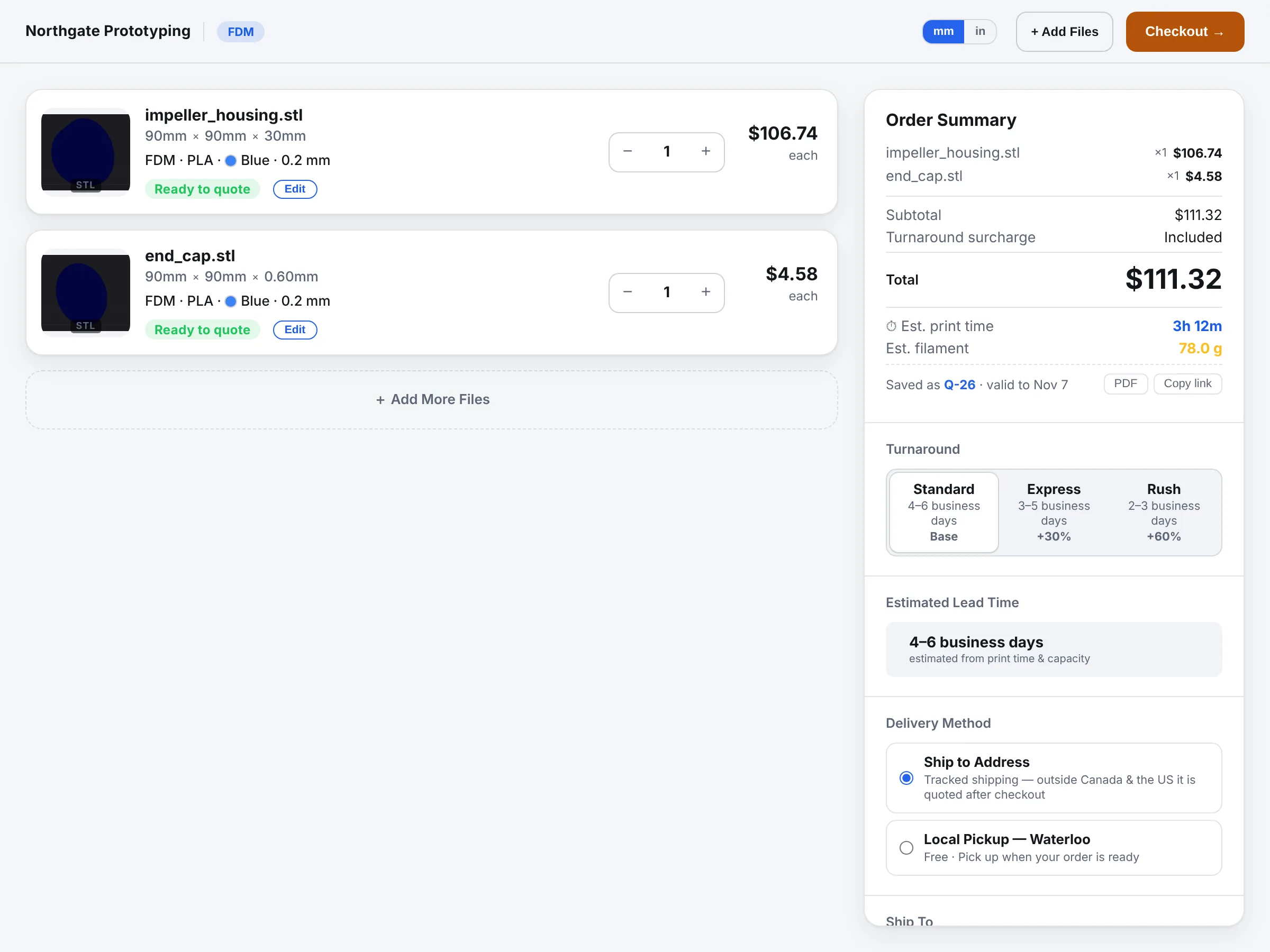
This is the real quote page on a made-up shop. Use your own STL, STEP, 3MF or OBJ, or our sample part. Nothing is ordered.

How it works

From file to approved quote, without you typing a price.

01

They upload a file

On your website, your Shopify store or by email. STL, STEP, 3MF and OBJ all work.

02

It measures the part

Volume, size, overhangs and support, read from the mesh. Bad files and parts too big for your printers get flagged.

03

It prices from your rates

Your material costs, machine time, labour and markup. Quantity discounts and rush turnaround the way you set them.

04

They approve and pay

On a page with your name and logo. The order lands on your board with the file attached.

Your shop, your prices

It quotes like you, not like a template.

Every shop starts on neutral defaults and enters its own numbers. Customer prices stay off until you're happy with them, so you can quote the first jobs yourself and compare.

  • Your materials, colours, layer heights and finishes
  • Never quotes below your cost
  • Your logo and colours on the quote page and emails
  • One script tag on your site, or a Shopify storefront
More on how quoting works →   The pricing engine →

The customer quote page for two uploaded STL files, each with a 3D preview, measured size, material and finish choices, and an order summary with turnaround and delivery options.

Questions

Auto quoting, the short answers.

What is a 3D printing auto quoter?

A quote form on your website that prices the part by itself. The customer uploads a 3D file, picks a material, quantity and turnaround, and sees a price right away instead of waiting for you to answer an email.

Whose prices does it use?

Yours. You enter what you pay for material, your machine rates, labour and markup. Customer prices stay off until you turn them on, so you can quote the first jobs by hand and check its numbers against yours.

What files can customers upload?

STL, STEP, 3MF and OBJ. The file is measured from the mesh: volume, size, overhangs and the support it will need. A file that looks like an inch export or won't fit your printers gets flagged, not priced.

Does it work on my website or Shopify store?

Yes. It goes on your site with one script tag, and there's a Shopify storefront option too. It carries your name, logo and colours, and customers approve the quote on a page with your name on it.

What happens after the customer gets a price?

They approve it, the order lands on your board with the file attached, and Layers3D runs it from there: invoice, printing, tracking page and shipping.

How much does it cost?

Plans start at CA$39 a month, and Founding Shops get Professional at CA$119.20 a month for their first year. See the pricing page for what each plan includes.

Stop typing quotes by hand.

Founding Shops get Professional at CA$119.20 a month for their first year. Not sure what to charge yet? Try the free price checker.

Become a Founding Shop