Help › Start here
Your first week
What the setup card and the Going live list on Home want from you, and why prices start switched off.
Pictures taken from Layers3D 2026.13.94 on Oct 7, 2026
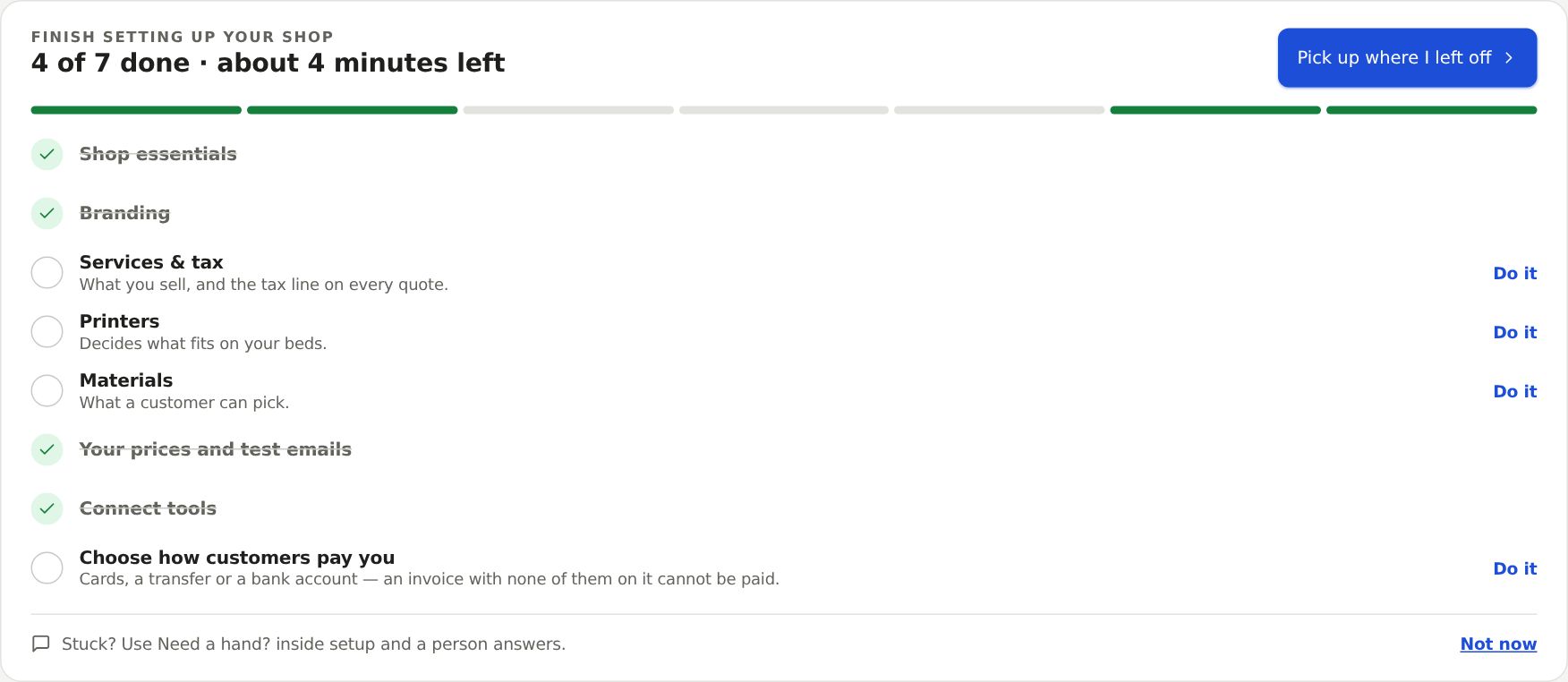
Your first week is mostly setup. Home tracks it with two cards at the top.
Finish setting up your shop
Seven steps, each ticked off as you fill it in, here or in Settings:
- Shop essentials: name, contact email, country and city.
- Branding: logo and colour.
- Services & tax: what you sell and your tax line.
- Printers: what fits on your beds.
- Materials: what a customer can pick.
- Your prices and test emails: your rate, and where test emails go.
- Connect tools: Outlook, Gmail, Wave, Shopify.
Click Do it on a row, or Pick up where I left off. Not now hides the card in this browser only.
Going live
Five items: name your shop, add your logo, turn on instant prices, put the quoter on your website, and your first quote. It goes away when all are done or you reach 10 orders. Hide removes it for good.
Why customers see "Request for Quote" at first
A new shop starts with instant prices off. Customers send a Request for Quote and you price it by hand, so your rates get checked on real jobs first. A banner on Home counts you to 10.
A quote counts when its part file was measured and you sent it. Ten delivered orders also count. Then you can switch on Show pricing to customers.
Where to go next
Next: Set your prices, then Put the quoter on your website. Quotes land on The Sell board.
Still stuck? Inside Layers3D, open Help and choose Message us. A person answers.