Help › Orders
The Sell board
Every quote you are chasing, from first request to a yes, in four columns.
Pictures taken from Layers3D 2026.13.94 on Oct 7, 2026
Open Orders and click Sell at the top. Every quote you are working on sits in one of four columns:
- Quoting: the next move is yours. Not priced or not sent yet.
- Waiting / Quoted: the quote is out, or you parked it until a date.
- Needs review: won work with a file and price to check.
- Won · to start: they said yes and nobody has started it yet.
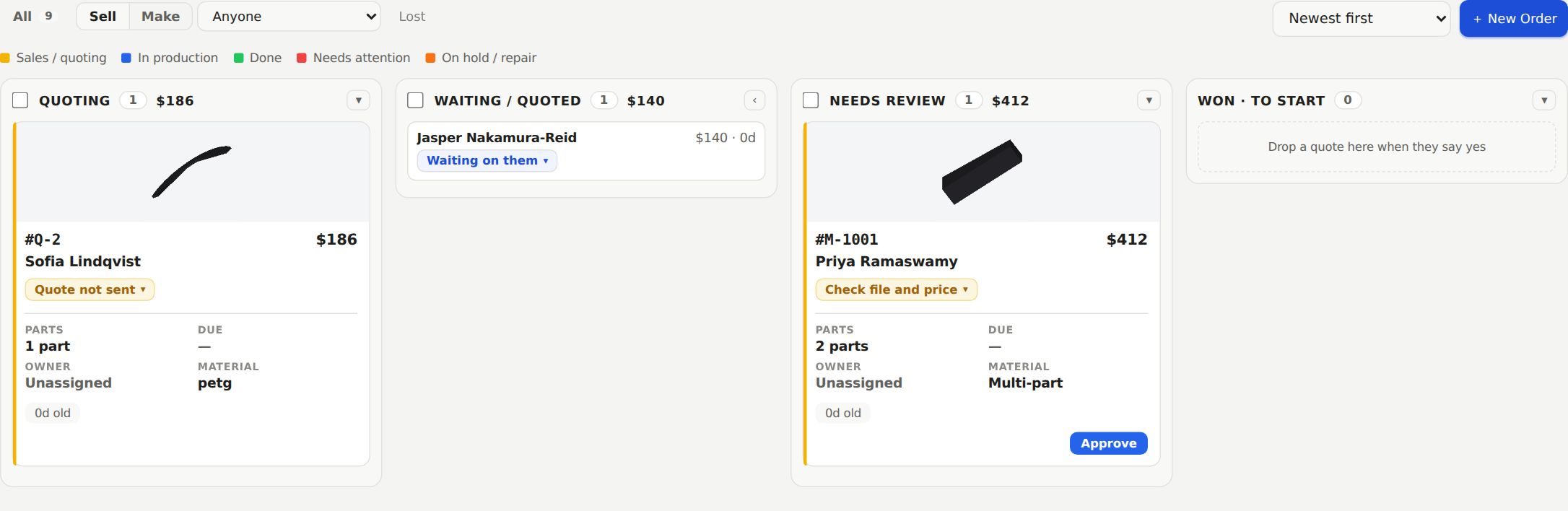
Each column header shows how many cards it has and what they add up to in dollars. A + after the total means more cards are further down.
What each card is waiting on
Every card has a chip that names the next thing it needs, like Needs a file, Needs a price, Quote not sent or Waiting on payment. Click the chip for the moves that make sense from there, such as Mark won… or recording a payment.
Cards also show their age in days.
Moving cards
Drag a card to another column. Dropping on Waiting / Quoted asks for a follow-up date. Dropping on Won · to start asks which estimate they said yes to. You can drag a card back to Quoting any time. On a phone, hold a card to move it.
Lost jobs
When a customer walks away, pick Mark lost… from the card's chip and say why. Lost work leaves the board. Click Lost at the top to see it, split into Marked lost, Cancelled and Declined.
To add a job by hand, click + New Order. Once it is won, the work moves to The Make board.
Still stuck? Inside Layers3D, open Help and choose Message us. A person answers.