Help › Getting paid
Choose how customers pay you
Pick the ways a customer can pay, connect Stripe for cards, and decide when the invoice goes out.
Pictures taken from Layers3D 2026.15.85 on Oct 17, 2026
Everything is in Settings › Getting paid. Changes save as you go.
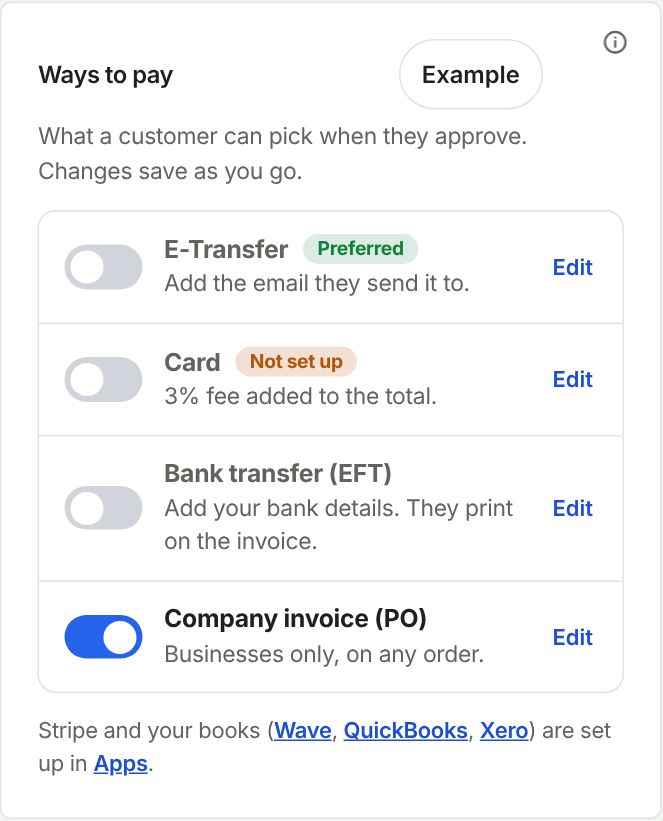
Ways to pay
Switch on each way a customer can pick when they approve, then click Edit on it to fill it in:
- E-Transfer: the email they send it to.
- Card: under How you take cards, pick Stripe and click Connect Stripe, or pick Another way and say what you use. Card fee % is added to the total when they pay by card. Use 0 for none.
- Bank transfer (EFT): your bank details. They print on the invoice.
- Company invoice (PO): for businesses that pay on a purchase order.
Customers don't see card until Stripe says connected. Stripe asks for your business and bank details once.
When they pay
Under Send the invoice, pick When they accept to get paid before you print, or When the parts are ready to bill at the end. You can also pick how a new customer pays their first order, and take a deposit on big orders.
Next
See Estimates & Invoices for what happens after you send.
Still stuck? Inside Layers3D, open Help and choose Message us. A person answers.