Help › Start here
Install the shop agent
The small program on a shop computer that slices, sends jobs to your printers and shows them live.
Pictures taken from Layers3D 2026.15.85 on Oct 17, 2026
The shop agent runs on a computer in your shop, on the same network as your printers. It sends approved jobs to the printers, slices files for real print times and grams, and shows live progress and cameras under Production. The computer needs to stay on.
It runs on Windows, Mac, Linux and Raspberry Pi 4 or 5.
Install it
- On the shop computer, open Layers3D and go to Shop setup › Slicing.
- Open Agent and computer and pick the computer under The computer it runs on.
- Windows: click Download Layers3D Agent (Windows) and open Layers3D-Agent.exe. If Windows warns you, click More info, then Run anyway.
- When it asks for a token, click Copy agent token and paste it in.
- Mac, Linux or Pi: click Copy the install command, open Terminal, paste it and press Enter.
- Click Check status. It says the agent is connected.
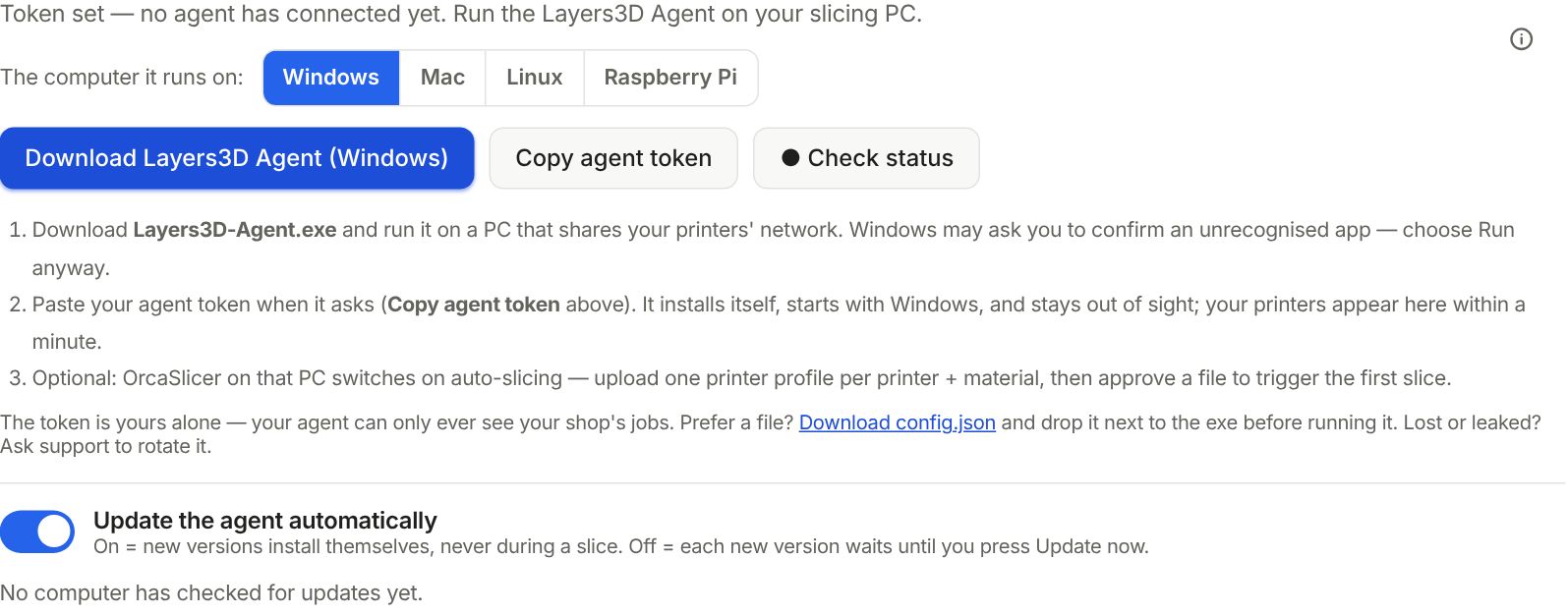
Leave Update the agent automatically on, so fixes reach it without you.
Next
Connect your printers: Add your printers. Slice in Bambu Studio and want to send from there? See Send from Bambu Studio (virtual printer).
Still stuck? Inside Layers3D, open Help and choose Message us. A person answers.